
How to Use Reference Images in Midjourney, FLUX & Stable Diffusion
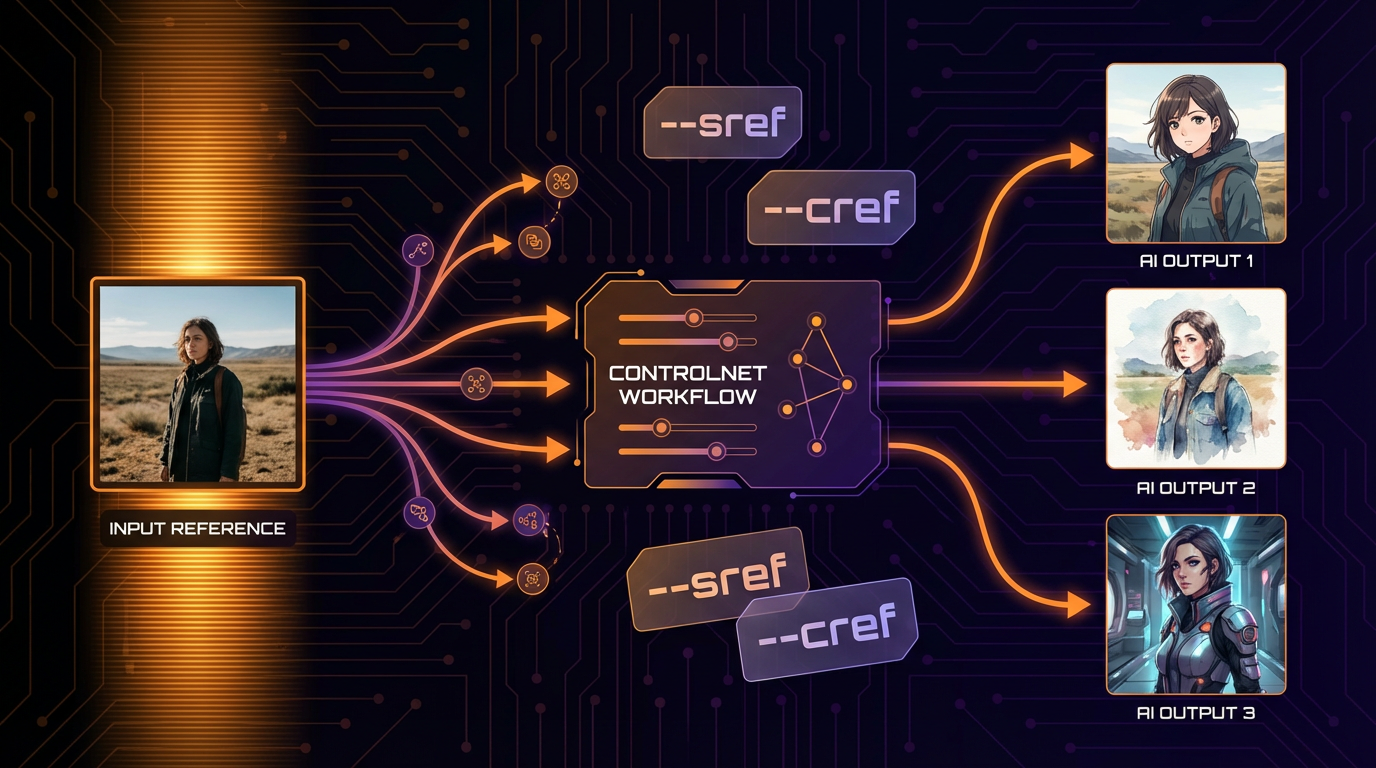
Reference images are one of the most powerful tools in AI image generation, yet many artists underutilize them. By providing visual references, you can guide AI models far more precisely than text alone allows. This guide covers how to effectively use reference images across Midjourney, FLUX, and Stable Diffusion.
Why Reference Images Matter
Text prompts have limitations. Describing "a specific shade of teal" or "that particular brush stroke style" in words is imprecise. Reference images communicate these details instantly and accurately.
Reference images help with:
- Exact color matching
- Specific artistic styles
- Pose and composition guidance
- Character consistency
- Texture and material accuracy
- Mood and atmosphere replication
Midjourney Reference System
Midjourney offers the most robust reference image system with multiple specialized tools.
Image Prompts (Basic)
Upload an image URL at the start of your prompt:
[image URL] a futuristic cityscape in this style
The AI analyzes the reference for style, color, and composition cues.
Style Reference (--sref)
Dedicated tool for extracting artistic style:
/imagine prompt: a portrait of a warrior --sref [style image URL]
Style Weight (--sw): Control how strongly the style applies (0-1000, default 100)
--sw 50: Subtle style influence--sw 100: Balanced (default)--sw 300: Strong style adherence--sw 1000: Maximum style lock
Character Reference (--cref)
Maintain character consistency across images:
/imagine prompt: [character] riding a horse through mountains --cref [character image URL]
Character Weight (--cw): Control face vs. full body consistency
--cw 0: Focus on face only--cw 100: Full character (clothing, accessories)
Combining References
Use multiple reference types together:
/imagine prompt: warrior in battle --cref [character URL] --sref [art style URL] --cw 100 --sw 200
Best Practices for Midjourney References
- Use high-quality, well-lit reference images
- Square or 4:3 images work best
- Avoid images with text or watermarks
- Multiple style references blend together
- Start with default weights, adjust as needed
Stable Diffusion Reference Methods
Stable Diffusion offers several powerful reference techniques through extensions and native features.
ControlNet
The most versatile reference system for Stable Diffusion:
Pose Control (OpenPose):
- Extract skeleton from reference image
- Generate new image matching that pose exactly
- Perfect for consistent character poses
Depth Control:
- Extract depth map from reference
- Maintain spatial relationships and composition
- Great for architectural and landscape consistency
Canny Edge:
- Extract outlines from reference
- Generate new image following those edges
- Ideal for object shapes and structures
Reference-Only:
- Use image purely for style/content guidance
- No structural control, just visual influence
IP-Adapter
Image prompt adapter for style and subject transfer:
- Upload reference image
- Adjust strength (0.0-1.0)
- Combine with text prompts
- Multiple images can be used together
Strength settings:
- 0.3-0.5: Light influence, text prompt dominant
- 0.5-0.7: Balanced blend
- 0.7-0.9: Strong image influence
- 0.9+: Near-reproduction of reference
img2img (Image-to-Image)
Transform existing images while maintaining structure:
- Load reference image
- Set denoising strength (0.3-0.8 typical)
- Add text prompt for desired changes
- Lower denoising = closer to original
Inpainting with Reference
Modify specific areas while keeping the rest:
- Mask the area to change
- Use another image as style reference
- Blend seamlessly with original
FLUX Reference Techniques
FLUX handles references differently depending on the implementation.
Redux (FLUX Reference)
Some FLUX implementations support image references:
- Upload style reference image
- Describe desired subject in text
- AI generates new content in reference style
Text-Based Reference Description
When direct image input isn't available, describe references in detail:
"In the style of [artist/aesthetic], with color palette similar to sunset photography, composition reminiscent of Renaissance portraits..."
FLUX ControlNet
Emerging ControlNet implementations for FLUX:
- Canny edge control
- Depth-guided generation
- Pose-controlled outputs
Preparing Reference Images
Image Selection Criteria
- Resolution: At least 512x512, ideally 1024+ pixels
- Clarity: Sharp, well-focused images
- Lighting: Clear, non-distracting lighting
- Simplicity: Avoid cluttered compositions
- Relevance: Only include what you want to transfer
Cropping for Purpose
- For style: Include representative artwork sections
- For character: Clear face at decent size
- For pose: Full body visible, clean background
- For color: Include all key colors you want
Creating Reference Composites
Sometimes combining multiple references works best:
- Pose reference from photo A
- Color palette from image B
- Style from artwork C
Common Reference Workflows
Style Replication
- Find artwork in your desired style
- Analyze key visual elements (brush strokes, colors, composition)
- Use as style reference with your own subject
- Adjust weight until style transfers without copying content
Character Sheet to Scenes
- Generate or obtain character reference sheet
- Use face/body as character reference
- Write scene prompts placing character in new contexts
- Maintain consistency across multiple generations
Photo to Illustration
- Start with photograph
- Use as structural/composition reference
- Add illustration style reference
- Generate stylized version maintaining composition
Troubleshooting Reference Issues
Reference overpowering prompt:
- Reduce reference strength/weight
- Make text prompt more specific and detailed
- Use structural references instead of style
Reference ignored:
- Increase reference strength/weight
- Use cleaner, simpler reference images
- Ensure reference and prompt don't conflict
Unwanted elements copying:
- Crop reference to exclude unwanted parts
- Use negative prompts to exclude copied elements
- Try different reference extraction methods
Style not matching:
- Use multiple images of same style
- Increase style weight significantly
- Choose more distinctive style references
Building a Reference Library
Organize references for quick access:
/references/styles/- Art styles, aesthetics/references/characters/- Character sheets, faces/references/poses/- Body positions, compositions/references/colors/- Palettes, mood boards/references/textures/- Materials, surfaces
Legal and Ethical Considerations
- Avoid using copyrighted artwork as direct references for commercial work
- Create your own reference images when possible
- Understand fair use limitations in your jurisdiction
- Credit inspiration sources when appropriate
- Be cautious with references containing recognizable people
Conclusion
Reference images bridge the gap between imagination and generation. Whether you're using Midjourney's dedicated reference parameters, Stable Diffusion's ControlNet system, or FLUX's emerging reference tools, mastering image-to-image guidance will dramatically improve your AI art results. Start building your reference library today, and experiment with different strength settings to find your perfect balance.